Complete HTML, CSS and JavaScript source codes used in live classes. Includes O Level practical programs, assignments, viva questions and previous year practical solutions.
  <!DOCTYPE html>
  <html>

  <head>
      <title>Age Verification</title>
  </head>

  <body>

      <script>
          var name = prompt("Enter Your Name:");
          var age = prompt("Enter Your Age:");

          if (age >= 18) {
              document.write("<h1 align='center'>Welcome to this site</h1>");
          }
          else {
              document.write("<h1 align='center'>Hello " + name + ", you are not authorized to visit the site</h1>");
          }
      </script>

  </body>

  </html>
▶️
Watch Now on YouTube
  <!DOCTYPE html>
  <html>

  <head>
      <title>Audio and Video</title>
  </head>

  <body>

      <h2>Audio Player</h2>

      <audio controls>
          <source src="demo-audio.mp3">
      </audio>

      <h2>Video Player</h2>

      <video controls width="480">
          <source src="demo-video.mp4">
      </video>

  </body>

  </html>
▶️
Watch Now on YouTube
  <!DOCTYPE html>
  <html>

  <head>
      <title>DEEPAKRAJTech Live Class</title>

      <style>
          div {
              text-align: center;
              font-size: 96px;
              font-weight: bold;
              text-decoration: underline;
          }

          div:hover {
              color: red;
              cursor: pointer;
          }
      </style>

  </head>

  <body>

      <div>Welcome</div>

  </body>

  </html>
▶️
Watch Now on YouTube
  <!DOCTYPE html>
  <html>

  <head>
      <title>3 Vertical Images</title>

      <style>
          .img-box {
              display: flex;
              flex-direction: column;
              align-items: center;
          }

          img {
              width: 400px;
              height: 600px;
              margin-top: 16px;
          }

          p {
              color: red;
              font-size: 24px;
          }
      </style>

  </head>

  <body>

      <div class="img-box">

          <img src="img1.jpeg" alt="Lord Shiva">
          <p>Lord Shiva</p>

          <img src="img2.jpeg" alt="Radha Rani">
          <p>Radha Rani</p>

          <img src="img3.jpeg" alt="Shree Ram">
          <p>Shree Ram</p>

      </div>

  </body>

  </html>
▶️
Watch Now on YouTube
  <!DOCTYPE html>
  <html>

  <head>
      <title>CSS Pseudo-Elements</title>

      <style>
          h1::first-letter {
              font-size: 48px;
              color: red;
          }

          p::before {
              content: "START: ";
              background-color: yellow;
          }

          p::after {
              content: " END";
              background-color: red;
          }
      </style>

  </head>

  <body>

      <h1>Pseudo-Elements</h1>

      <p>This text has content added before and after.</p>

  </body>

  </html>
▶️
Watch Now on YouTube
  <!DOCTYPE html>
  <html>

  <head>
      <title>Student Marks</title>
  </head>

  <body>

      <table border="1" align="center" width="50%" cellpadding="10">

          <tr bgcolor="yellow">
              <th rowspan="2">Enrollment No.</th>
              <th rowspan="2">Name</th>
              <th colspan="2">Marks</th>
          </tr>

          <tr bgcolor="yellow">
              <td>Physics</td>
              <td>Chemistry</td>
          </tr>

          <tr>
              <td>A101</td>
              <td>Priya</td>
              <td>40</td>
              <td>50</td>
          </tr>

          <tr>
              <td>A102</td>
              <td>Harish</td>
              <td>60</td>
              <td>70</td>
          </tr>

          <tr>
              <td>A103</td>
              <td>Krishna</td>
              <td>55</td>
              <td>65</td>
          </tr>

      </table>

  </body>

  </html>
▶️
Watch Now on YouTube
  <!DOCTYPE html>
  <html>

  <head>
      <title>Blinking & Scrolling Text</title>

      <style>
          .blink {
              text-align: center;
              font-size: 72px;
              animation: blink 1s infinite;
          }

          @keyframes blink {
              50% {
                  opacity: 0;
              }
          }
      </style>

  </head>

  <body bgcolor="green">

      <h1 class="blink">WELCOME</h1>

      <marquee>Hello World</marquee>

  </body>

  </html>
▶️
Watch Now on YouTube
  <!DOCTYPE html>
  <html>

  <head>
      <title>Time Table</title>
  </head>

  <body>

      <table border="1" align="center" cellspacing="8" cellpadding="10" width="50%">

          <tr bgcolor="yellow">
              <th colspan="3">O LEVEL TIME TABLE</th>
          </tr>

          <tr>
              <td rowspan="2">HTML</td>
              <td>Theory</td>
              <td>Practical</td>
          </tr>

          <tr>
              <td>09:00 AM</td>
              <td>10:00 AM</td>
          </tr>

          <tr>
              <td rowspan="2">CSS</td>
              <td>Theory</td>
              <td>Practical</td>
          </tr>

          <tr>
              <td>09:00 AM</td>
              <td>10:00 AM</td>
          </tr>

      </table>

  </body>

  </html>
▶️
Watch Now on YouTube
  <!DOCTYPE html>
  <html>

  <head>
      <title>Simple Calculator Using JavaScript</title>
  </head>

  <body>

      <center>

          <h1>Calculator</h1>

          <table border="1" cellpadding="20" cellspacing="8">

              <tr>
                  <td>First Number</td>
                  <td>Second Number</td>
              </tr>

              <tr>
                  <td><input type="text" id="n1"></td>
                  <td><input type="text" id="n2"></td>
              </tr>

              <tr>
                  <td colspan="2" align="center">
                      <input type="button" value="+" onclick="add()">
                      <input type="button" value="-" onclick="sub()">
                      <input type="button" value="*" onclick="mul()">
                      <input type="button" value="/" onclick="div()">
                  </td>
              </tr>

              <tr>
                  <td colspan="2" align="center">
                      <input type="text" id="ans">
                  </td>
              </tr>

          </table>

      </center>

      <script>

          function add() {
              var a = parseFloat(document.getElementById("n1").value);
              var b = parseFloat(document.getElementById("n2").value);
              document.getElementById("ans").value = a + b;
          }

          function sub() {
              var a = parseFloat(document.getElementById("n1").value);
              var b = parseFloat(document.getElementById("n2").value);
              document.getElementById("ans").value = a - b;
          }

          function mul() {
              var a = parseFloat(document.getElementById("n1").value);
              var b = parseFloat(document.getElementById("n2").value);
              document.getElementById("ans").value = a * b;
          }

          function div() {
              var a = parseFloat(document.getElementById("n1").value);
              var b = parseFloat(document.getElementById("n2").value);
              document.getElementById("ans").value = a / b;
          }

      </script>

  </body>

  </html>
▶️
Watch Now on YouTube
  <!DOCTYPE html>
  <html>

  <head>
      <title>JavaScript | Series of Odd and Even 1 to 100</title>
  </head>

  <body>

      <script>
          document.write("<h1>Odd Number</h1>");

          for (let i = 1; i <= 100; i++) {
              if (i % 2 == 1) {
                  document.write(i + " ");
              }
          }

          document.write("<h1>Even Number</h1>");

          for (let i = 1; i <= 100; i++) {
              if (i % 2 == 0) {
                  document.write(i + " ");
              }
          }
      </script>

  </body>

  </html>
▶️
Watch Now on YouTube
  <!DOCTYPE html>
  <html>

  <head>
      <title>Java Script to Print Factorial</title>
  </head>

  <body>

      <script>
          var n = prompt("Enter a Number: ");
          var fact = 1;

          while (n >= 1) {
              fact = fact * n;
              n = n - 1;
          }

          document.write("Factorial = " + fact);
      </script>

  </body>

  </html>
▶️
Watch Now on YouTube
    <!DOCTYPE html>
    <html>

    <head>
        <title>JavaScript to check prime or not</title>
    </head>

    <body>

        <script>
            var n = prompt("Enter a Number: ");
            var i;

            for (i = 2; i < n; i++) {
                if (n % i == 0) {
                    break;
                }
            }

            if (i == n) {
                document.write(n + " Prime Number");
            } else {
                document.write(n + " Not Prime Number");
            }
        </script>

    </body>

    </html>
▶️
Watch Now on YouTube
  <!DOCTYPE html>
  <html>

  <head>
      <title>
          JS Series of Prime Numbers
      </title>
  </head>

  <body>

      <h1>Series of Prime Numbers</h1>

      <script>
          for (var n = 1; n <= 100; n++) {
              for (var i = 2; i < n; i++) {
                  if (n % i == 0) {
                      break;
                  }
              }

              if (i == n) {
                  document.write(n + " ");
              }
          }
      </script>

  </body>

  </html>
▶️
Watch Now on YouTube
  <!DOCTYPE html>
  <html>

  <head>
      <title>JS Students Result Information</title>
  </head>

  <body>

      Marks 1: <input type="text" id="m1"> <br><br>
      Marks 2: <input type="text" id="m2"> <br><br>
      Marks 3: <input type="text" id="m3"> <br><br>

      <button onclick="result()">Result</button>

      <p id="total"></p>
      <p id="avarage"></p>
      <p id="result"></p>
      <p id="grade"></p>

      <script>
          function result() {

              var m1 = parseInt(document.getElementById("m1").value);
              var m2 = parseInt(document.getElementById("m2").value);
              var m3 = parseInt(document.getElementById("m3").value);

              var total = m1 + m2 + m3;
              var avg = total / 3;
              var res = (avg >= 33) ? "Pass" : "Fail";

              var garde;

              if (avg >= 85) {
                  garde = "S";
              } else if (avg >= 75) {
                  garde = "A";
              } else if (avg >= 65) {
                  garde = "B";
              } else if (avg >= 55) {
                  garde = "C";
              } else {
                  garde = "D";
              }

              document.getElementById("total").innerHTML = "Total marks: " + total;

              document.getElementById("avarage").innerHTML = "Avarage: " + avg;

              document.getElementById("result").innerHTML = "Result: " + res;

              document.getElementById("grade").innerHTML = "Grade: " + garde;
          }
      </script>

  </body>

  </html>
▶️
Watch Now on YouTube
  <!DOCTYPE html>
  <html>

  <head>
      <title>JS Simple Interest</title>
  </head>

  <body>

      Principal Amount: <input type="text" id="p"> <br><br>
      Rate of Interest: <input type="text" id="r"> <br><br>
      Duration in Years: <input type="text" id="t">
      <br><br>

      <button onclick="interest()">OK</button>

      <h3 id="si"></h3>

      <script>
          function interest() {

              var p = parseFloat(document.getElementById("p").value);

              var r = parseFloat(document.getElementById("r").value);

              var t = parseInt(document.getElementById("t").value);

              var si = (p * r * t) / 100;

              document.getElementById("si").innerHTML =
                  "Simple Interest of Principal Amount: " + si;
          }
      </script>

  </body>

  </html>
▶️
Watch Now on YouTube
    <!DOCTYPE html>
    <html>

    <head>
        <title>JS Display the Current Day and Time</title>
    </head>

    <body>

        <script>
            var today = new Date();

            var days = ["Sunday", "Monday", "Tuesday", "Wednesday",
                "Thursday", "Friday", "Saturday"
            ];

            document.write("Today is: " + days[today.getDay()]);

            var hour = today.getHours();
            var minute = today.getMinutes();
            var second = today.getSeconds();

            var ampm = hour >= 12 ? "PM" : "AM";

            hour = hour % 12;

            hour = hour ? hour : 12;

            document.write("Current time is: " + hour + " " + ampm +
                " : " + minute + " : " + second);
        </script>

    </body>

    </html>
▶️
Watch Now on YouTube
  <!DOCTYPE html>
  <html>

  <head>
      <title>Background image</title>

      <style>
          .circle {
              width: 200px;
              height: 200px;
              border: 8px double black;
              border-radius: 100px;
              background-color: red;
          }

          .circle:hover {
              background-color: yellow;
          }
      </style>

  </head>

  <body>

      <div class="circle"></div>

  </body>

  </html>
▶️
Watch Now on YouTube
  <!DOCTYPE html>
  <html>

  <head>
      <title>Background image</title>

      <style>
          body {
              background: url("https://gw-nielit-prod.s3.ap-south-1.amazonaws.com/test_image/sample_2.png") no-repeat right top;
          }
      </style>

  </head>

  <body>

      <h1>Image show it once, in the top right corner</h1>

  </body>

  </html>
▶️
Watch Now on YouTube
  <!DOCTYPE html>
  <html>

  <head>
      <title>Sum and Multiply Using JavaScript</title>
  </head>

  <body>

      <center>

          <h1>Sum and Multiply of Two Numbers</h1>
          <hr>

          Enter First Number : <input type="text" id="num1">
          <br>

          Enter Second Number : <input type="text" id="num2">
          <br><br>

          <button onclick="add()">Add</button>
          <button onclick="multiply()">Multiply</button>

          <h3 id="ans" style="background-color: yellow;"></h3>

      </center>

      <script>

          function add() {
              var a = parseInt(document.getElementById("num1").value);
              var b = parseInt(document.getElementById("num2").value);

              document.getElementById("ans").innerHTML = "Sum = " + (a + b);
          }

          function multiply() {
              var a = parseInt(document.getElementById("num1").value);
              var b = parseInt(document.getElementById("num2").value);

              document.getElementById("ans").innerHTML = "Multiplication = " + (a * b);
          }

      </script>

  </body>

  </html>
▶️
Watch Now on YouTube
  <!DOCTYPE html>
  <html>

  <head>
      <title>JavaScript Function</title>
  </head>

  <body>

      <center>

          <h2>Redirect, Popup and Print</h2>
          <hr>

          <button onclick="popup()">Popup</button>
          <button onclick="redirect()">Redirect</button>
          <button onclick="printPage()">Print</button>

      </center>

      <script>

          function popup() {
              alert("Welcome to O Level Practical Exam Live Class");
          }

          function redirect() {
              window.location.href = "https://deepakrajtech.com/";
          }

          function printPage() {
              window.print();
          }

      </script>

  </body>

  </html>
▶️
Watch Now on YouTube
▶️
Watch Now on YouTube
  <!DOCTYPE html>
  <html>

  <head>
      <title>Notice Board</title>

      <style>
          .blink {
              text-align: center;
              color: white;
              animation: blink 1s infinite;
          }

          @keyframes blink {
              50% {
                  opacity: 0;
              }
          }
      </style>

  </head>

  <body bgcolor="blue">

      <h1 class="blink">Notice Board</h1>

      <marquee style="color: white;">
          Admit Cards for NIELIT O Level Practical Examination for July 2026 available on Student Portal
      </marquee>

  </body>

  </html>
▶️
Watch Now on YouTube
  <!DOCTYPE html>
  <html>

  <head>
      <meta charset="UTF-8">
      <meta name="viewport" content="width=device-width, initial-scale=1.0">
      <title>Login Form Validation | DEEPAKRAJTech</title>
  </head>

  <body>
      <form action="action.html" onsubmit="return check()">
          Username: <input type="text" id="user">
          Password: <input type="password" id="pass">
          <input type="submit" value="Login">
      </form>

      <script>
          function check() {
              var user = document.getElementById("user").value;
              var pass = document.getElementById("pass").value;
              if (user == "") {
                  alert("Please Enter Username");
                  return false;
              }
              if (pass == "") {
                  alert("Please Enter Password");
                  return false;
              }
              return true;
          }
      </script>
  </body>

  </html>
▶️
Watch Now on YouTube
  <!DOCTYPE html>
  <html>

  <head>
      <meta charset="UTF-8">
      <meta name="viewport" content="width=device-width, initial-scale=1.0">
      <title>Different Colors Lines with Text | DEEPAKRAJTech</title>
  </head>

  <body bgcolor="black" style="text-align: center;">
      <p style="color: red;">Red Line</p>
      <hr color="red">
      <p style="color: green;">Green Line</p>
      <hr color="green">
      <p style="color: yellow;">Yellow Line</p>
      <hr color="yellow">
      <p style="color: blue;">Blue Line</p>
      <hr color="blue">
      <p style="color: pink;">Pink Line</p>
      <hr color="pink">
      <p style="color: orange;">Orange Line</p>
      <hr color="orange">
  </body>

  </html>
▶️
Watch Now on YouTube
  <!DOCTYPE html>
  <html>

  <head>
      <meta charset="UTF-8">
      <meta name="viewport" content="width=device-width, initial-scale=1.0">
      <title>Demonstrates the Anchor Tag | DEEPAKRAJTech</title>
  </head>

  <body>
      <section id="home">
          <h1>This is My Home Page</h1>
          <a href="#conatct" target="_blank">Go to Contact Page</a>
      </section>
      <hr>

      <section>
          <h1>Importents Links</h1>
          <a href="https://deepakrajtech.com/" target="_blank">Open Website in New Tab</a>
          <br><br>
          <a href="mypdf.pdf" download>Download PDF File</a>
      </section>

      <hr>
      <section id="conatct">
          <h1>This is My Contact Page</h1>
          <a href="#home" target="_blank">Go to Home Page</a>
      </section>
  </body>

  </html>
▶️
Watch Now on YouTube
  <!DOCTYPE html>
  <html>

  <head>
      <meta charset="UTF-8">
      <meta name="viewport" content="width=device-width, initial-scale=1.0">
      <title>Center-Align Div | DEEPAKRAJTech</title>
      <style>
          .main {
              width: 100vw;
              height: 100vh;
              display: flex;
              align-items: center;
              justify-content: center;
          }
      </style>
  </head>

  <body>
      <div class="main">
          Hello World
      </div>
  </body>

  </html>
▶️
Watch Now on YouTube
  <!DOCTYPE html>
  <html>

  <head>
      <meta charset="UTF-8">
      <meta name="viewport" content="width=device-width, initial-scale=1.0">
      <title>JavaScript Program to Calculate Days | DEEPAKRAJTech</title>
  </head>

  <body>
      <script>
          var futureDate = new Date(prompt("Enter Future Date (YYYY-MM-DD):"));
          var today = new Date();
          var difference = futureDate - today;
          var days = Math.ceil(difference / (1000 * 60 * 60 * 24));
          document.write(days + " Days Remaining");
      </script>
  </body>

  </html>
▶️
Watch Now on YouTube
  <!DOCTYPE html>
  <html>

  <head>
      <meta charset="UTF-8">
      <meta name="viewport" content="width=device-width, initial-scale=1.0">
      <title>My Dream Vacation | DEEPAKRAJTech</title>
      <style>
          body {
              background-image: url("kashmir.jpg");
              background-size: cover;
          }

          p {
              font-size: 32px;
          }
      </style>
  </head>

  <body>
      <h1 align="center" style="color: blue;"><b><i>My Dream Vacation Kashmir (India)</i></b></h1>
      <p style="color: green;"><i>1. Dal Lake</i></p>
      <p style="color: blueviolet;"><b>2. Gulmarg</b></p>
      <p style="color: red;"><u>3. Pahalgam</u></p>
      <p style="color: chartreuse;"><b><i>4. Sonamarg</i></b></p>
      <p style="color: yellow;"><i><u>5. Tulip Garden</u></i></p>
  </body>

  </html>
▶️
Watch Now on YouTube
  <!DOCTYPE html>
  <html>

  <head>
      <meta charset="UTF-8">
      <meta name="viewport" content="width=device-width, initial-scale=1.0">
      <title>Student Admission | DEEPAKRAJTech</title>
  </head>

  <body>
      <h1 align="center">Student Admission Form</h1>
      <hr>
      <form action="#">
          Full Name: <input type="text"> <br><br>

          Gender:
          <input type="radio" name="gender"> Male
          <input type="radio" name="gender"> Female <br><br>

          Stream:
          <select name="Stream">
              <option>Science</option>
              <option>Commerce</option>
              <option>Arts</option>
          </select> <br><br>

          Hobbies:
          <input type="checkbox"> Coding
          <input type="checkbox"> Cricket
          <input type="checkbox"> Music <br><br>

          Email: <input type="email"> <br><br>
          Password: <input type="password"> <br><br>

          <input type="submit" value="Submit">
      </form>
  </body>

  </html>
▶️
Watch Now on YouTube
  <!DOCTYPE html>
  <html>

  <head>
      <meta charset="UTF-8">
      <meta name="viewport" content="width=device-width, initial-scale=1.0">
      <title>Greeting Message Using | JavaScript DEEPAKRAJTech</title>
  </head>

  <body>
      <script>
          var name = prompt("Enter your name:");
          var age = prompt("Enter your age:");
          document.write("Hello " + name + " ! You are " + age + " Years old.");
      </script>
  </body>

  </html>
▶️
Watch Now on YouTube
  <!DOCTYPE html>
  <html>

  <head>
      <meta charset="UTF-8">
      <meta name="viewport" content="width=device-width, initial-scale=1.0">
      <title>My Favorite Festival | DEEPAKRAJTech</title>
      <style>
          .blink{
              text-align: center;
              font-size: 24px;
              animation: blinkText 1s infinite;
          }
          @keyframes blinkText{
            50% {opacity: 0;}
          }
      </style>
  </head>

  <body style="background-image: linear-gradient(orange, white, green);">
      <h1 style="color: red; text-align: center;">Republic Day 26 Jan</h1>
      <hr>
      <p style="color: orange; font-size: 24px;">National Flag is Hoisted</p>
      <p style="color: gray; font-size: 28px;">Republic Day Parade Organized</p>
      <p style="color: green; font-size: 30px;">Cultural Program are Performed</p>

      <p class="blink">Happy Republic Day!</p>
      <marquee>26 January Happy Republic Day!</marquee>
  </body>

  </html>
▶️
Watch Now on YouTube
  <!DOCTYPE html>
  <html>

  <head>
      <meta charset="UTF-8">
      <meta name="viewport" content="width=device-width, initial-scale=1.0">
      <title>HTML Form Validation | DEEPAKRAJTech</title>
  </head>

  <body>
      <form action="#">
          <label for="email">Enter Email: </label>
          <input type="email" id="email" name="email" required autofocus> <br><br>

          <label for="age">Enter Age: </label>
          <input type="number" id="age" name="age"> <br><br>

          <label for="dob">DOB: </label>
          <input type="date" id="dob" name="dob"> <br><br>

          <label for="range">Select Range: </label>
          <input type="range" id="range" name="range" min="1" max="10"> <br><br>

          <input type="submit" value="Submit">
      </form>
  </body>

  </html>
▶️
Watch Now on YouTube
  <!DOCTYPE html>
  <html>

  <head>
      <meta charset="UTF-8">
      <meta name="viewport" content="width=device-width, initial-scale=1.0">
      <title>Fruits | DEEPAKRAJTech</title>
  </head>

  <body>

      <h1>My Favorite Fruits</h1>

      <ol>
          <li>Apple</li>
          <li>Banana</li>
          <li>Mango</li>
          <li>Grapes</li>
          <li>Pineapple</li>
      </ol>

  </body>

  </html>
▶️
Watch Now on YouTube
  <!DOCTYPE html>
  <html>

  <head>
      <meta charset="UTF-8">
      <meta name="viewport" content="width=device-width, initial-scale=1.0">
      <title>JavaScript Even or Odd | DEEPAKRAJTech</title>
  </head>

  <body>

      <script>
          var n = prompt("Enter any Number :");

          if (n % 2 == 0) {
              document.write(n + " Even Number");
          } else {
              document.write(n + " Odd Number");
          }
      </script>

  </body>

  </html>
▶️
Watch Now on YouTube
  <!DOCTYPE html>
  <html>

  <head>
    <meta charset="UTF-8">
    <meta name="viewport" content="width=device-width, initial-scale=1.0">
    <title>My Webpage | DEEPAKRAJTech</title>
  </head>

  <body>

    <h1 align="center">Welcome to My Webpage</h1>
    <hr>

    <p>
      My name is <b>Deepak Raj</b>.
      I am a <i>Student</i> and I <u>Love Coding.</u>
    </p>

    <p>
      I am learning <b>HTML</b> and <b>CSS</b>
      to create <i>Webpage</i>.
    </p>

  </body>

  </html>
▶️
Watch Now on YouTube
  <!DOCTYPE html>
  <html>

  <head>
      <meta charset="UTF-8">
      <meta name="viewport" content="width=device-width, initial-scale=1.0">
      <title>Welcome | DEEPAKRAJTech</title>

      <style>
          .main {
              text-align: center;
              font-size: 72px;
              font-weight: bold;
              text-decoration: underline;
          }

          .main:hover {
              color: blue;
              cursor: pointer;
          }
      </style>
  </head>

  <body>
      <p class="main">Welcome</p>
  </body>

  </html>
▶️
Watch Now on YouTube
  <!DOCTYPE html>
  <html>

  <head>
      <meta charset="UTF-8">
      <meta name="viewport" content="width=device-width, initial-scale=1.0">
      <title>Student Profile | DEEPAKRAJTech</title>
  </head>

  <body>

      <table border="1" width="100%">

          <tr bgcolor="orange">
              <th colspan="3">Student Profile</th>
          </tr>

          <tr>

              <td>
                  <b>Personal Details</b><br>
                  Name: Rahul<br>
                  Age: 25<br>
                  Address: Sultanpur
              </td>

              <td>
                  <b>Academic Information</b><br><br>

                  <table border="1" width="100%">
                      <tr>
                          <th>Subject</th>
                          <th>Grade</th>
                      </tr>
                      <tr>
                          <td>HTML</td>
                          <td>A</td>
                      </tr>
                      <tr>
                          <td>CSS</td>
                          <td>B</td>
                      </tr>
                  </table>
              </td>

              <td>
                  <b>Hobbies</b>
                  <ul>
                      <li>Reading</li>
                      <li>Learning</li>
                      <li>Coding</li>
                  </ul>
              </td>

          </tr>

      </table>

  </body>

  </html>
▶️
Watch Now on YouTube
  <!DOCTYPE html>
  <html>

  <head>
    <meta charset="UTF-8">
    <meta name="viewport" content="width=device-width, initial-scale=1.0">
    <title>Employee Table | DEEPAKRAJTech</title>
  </head>

  <body>

    <h2 align="center">Employee Details</h2>

    <table border="1" cellpadding="5" cellspacing="0" width="50%" align="center">

      <tr>
        <th colspan="3">Employee Information</th>
      </tr>

      <tr>
        <th>Department</th>
        <th>Employee Name</th>
        <th>Salary</th>
      </tr>

      <tr>
        <td rowspan="2">IT</td>
        <td>Ravi</td>
        <td>30000</td>
      </tr>

      <tr>
        <td>Amit</td>
        <td>32000</td>
      </tr>

      <tr>
        <td rowspan="2">HR</td>
        <td>Neha</td>
        <td>28000</td>
      </tr>

      <tr>
        <td>Priya</td>
        <td>29000</td>
      </tr>

    </table>

  </body>

  </html>
▶️
Watch Now on YouTube
  <!DOCTYPE html>
  <html>

  <head>
    <meta charset="UTF-8">
    <meta name="viewport" content="width=device-width, initial-scale=1.0">
    <title>College Details | DEEPAKRAJTech</title>
  </head>

  <body>

    <h1 align="center">College Infrastructure</h1>
    <hr>

    <table border="1" align="center" width="50%" cellpadding="8">

      <tr>
        <th>Facility</th>
        <th>Details</th>
      </tr>

      <tr>
        <td>Class Room</td>
        <td>Clean and big class room</td>
      </tr>

      <tr>
        <td>Computer Lab</td>
        <td>Many computer with internet</td>
      </tr>

      <tr>
        <td>Library</td>
        <td>Books for all students</td>
      </tr>

      <tr>
        <td>Play Ground</td>
        <td>Place for games</td>
      </tr>

    </table>

  </body>

  </html>
▶️
Watch Now on YouTube
<!DOCTYPE html>
<html>
<head>
<meta charset="UTF-8">
<meta name="viewport" content="width=device-width, initial-scale=1.0">
<title>HTML List | DEEPAKRAJTech</title>
</head>
<body>
<h1>My 3 Favorite Books</h1>
<ol>
<li>HTML Book</li>
<li>CSS Book</li>
<li>JavaScript Book</li>
</ol>
<h1>My Hobbies</h1>
<ul>
<li>Teaching</li>
<li>Reading</li>
<li>Coding</li>
</ul>
<h1>HTML Tags</h1>
<dl>
<dt><h1></dt>
<dd>Main Heading Tag</dd>
<dt><p></dt>
<dd>Paragraph Tag</dd>
<dt><br></dt>
<dd>Line Break Tag</dd>
</dl>
</body>
</html>
▶️
Watch Now on YouTube
  <!DOCTYPE html>
  <html>

  <head>
      <meta charset="UTF-8">
      <meta name="viewport" content="width=device-width, initial-scale=1.0">
      <title>Digital Stopwatch | DEEPAKRAJTech</title>
      <style>
          body {
              font-family: sans-serif;
              font-size: 32px;
          }

          button {
              font-size: 32px;
          }
      </style>
  </head>

  <body>
      <center>
          <h2>Digital Stopwatch</h2>
          <hr>
          <h1 id="time">00 : 00 : 00</h1>

          <button onclick="start()">Start</button>
          <button onclick="stop()">Stop</button>
          <button onclick="reset()">Reset</button>
      </center>

      <script>
          var h = 0, m = 0, s = 0;
          var timer = null;

          function start() {
              if (timer == null) {
                  timer = setInterval(run, 1000);
              }
          }

          function run() {
              s++;

              if (s == 60) {
                  s = 0;
                  m++;
              }

              if (m == 60) {
                  m = 0;
                  h++;
              }

              document.getElementById("time").innerHTML =
                  (h < 10 ? "0" + h : h) + " : " +
                  (m < 10 ? "0" + m : m) + " : " +
                  (s < 10 ? "0" + s : s);
          }

          function stop() {
              clearInterval(timer);
              timer = null;
          }

          function reset() {
              clearInterval(timer);
              timer = null;
              h = 0; m = 0; s = 0;
              document.getElementById("time").innerHTML = "00 : 00 : 00";
          }
      </script>
  </body>

  </html>
▶️
Watch Now on YouTube
  <!DOCTYPE html>
  <html>

  <head>
      <meta charset="UTF-8">
      <meta name="viewport" content="width=device-width, initial-scale=1.0">
      <title>Create a Table in HTML | DEEPAKRAJTech</title>
  </head>

  <body>

      <table border="1" width="600" height="400" align="center">

          <caption><b>Student Course Fee Details</b></caption>

          <thead>
              <tr>
                  <th>Name</th>
                  <th>Course</th>
                  <th>Fee</th>
              </tr>
          </thead>

          <tbody>
              <tr>
                  <td>Rahul Kumar</td>
                  <td>HTML</td>
                  <td>1500</td>
              </tr>
              <tr>
                  <td>Shyam Kumar</td>
                  <td>CSS</td>
                  <td>2000</td>
              </tr>
              <tr>
                  <td>Ram Kumar</td>
                  <td>JavaScript</td>
                  <td>3000</td>
              </tr>
          </tbody>

          <tfoot>
              <tr>
                  <th>Total</th>
                  <th>3</th>
                  <th>6500</th>
              </tr>
          </tfoot>

      </table>

  </body>

  </html>
▶️
Watch Now on YouTube
  <!DOCTYPE html>
  <html>
  <head>
      <meta charset="UTF-8">
      <meta name="viewport" content="width=device-width, initial-scale=1.0">
      <title>Anchor Tag Behaviors</title>
  </head>
  <body>
      <body>
      <h1 id="top">Home</h1>
      <hr>
      <a href="#Contact">Go to Contact Us</a>
      <hr><br>
      <a href="mypdf.pdf" target="_blank">Opens PDF New Tab</a>
      <hr><br>
      <a href="mydoc.docx" download>Downloadable Docx File</a>
      <hr>
      <h1 id="Contact">Contact Us</h1>
      <hr>
      <a href="#top">Go To Top</a>
  </body>
  </body>
  </html>
▶️
Watch Now on YouTube
  <!DOCTYPE html>
  <html>

  <head>
      <meta charset="UTF-8">
      <meta name="viewport" content="width=device-width, initial-scale=1.0">
      <title>Displays a different Quote using JavaScript</title>
  </head>

  <body>
      <center>
          <button onclick="document.getElementById('demo').innerHTML='Small steps every day lead to big success'">
              Show Quote 1
          </button>

          <button onclick="document.getElementById('demo').innerHTML='Learn today, lead tomorrow'">
              Show Quote 2
          </button>

          <button onclick="document.getElementById('demo').innerHTML='Consistency beats talent'">
              Show Quote 3
          </button>

          <h1 id="demo"></h1>
      </center>
  </body>

  </html>
▶️
Watch Now on YouTube
  <!DOCTYPE html>
  <html>

  <head>
      <meta charset="UTF-8">
      <meta name="viewport" content="width=device-width, initial-scale=1.0">
      <title>Polynomial Expression | DEEPAKRAJTech</title>
  </head>

  <body>
      <h2>Polynomial Expression</h2>

      <p>
          4x<sup>3</sup> + 3x<sup>2</sup> - 2x + 7
      </p>
  </body>

  </html>
▶️
Watch Now on YouTube
  <!DOCTYPE html>
  <html>
  <head>
      <meta charset="UTF-8">
      <meta name="viewport" content="width=device-width, initial-scale=1.0">
      <title>Click to Remove Picture | DEEPAKRAJTech</title>
  </head>
  <body>
      <center>
          <h1>Click to Remove Picture</h1>
          <img src="https://picsum.photos/300" alt="Technology" border="1" onclick="this.style.display='none';" style="cursor: pointer;  ">
      </center>
  </body>
  </html>
▶️
Watch Now on YouTube
  <!DOCTYPE html>
  <html lang="en">
  <head>
      <meta charset="UTF-8">
      <title>Hello World Bold & Italic</title>
  </head>
  <body>
      <b><i>Hello world</i></b>
  </body>
  </html>
▶️
Watch Now on YouTube
  <!DOCTYPE html>
  <html>
  <head>
      <title>Warning Page | DEEPAKRAJTech</title>
      <style>
          body {
              background-color: red;
              color: white;
              text-align: center;
              margin-top: 100px;
              font-family: Arial, sans-serif;
          }

          .blinking {
              font-size: 80px;
              font-weight: bold;
              animation: blink 1s step-start infinite;
          }

          @keyframes blink {
              50% {
                  opacity: 0;
              }
          }

          marquee {
              font-size: 30px;
              margin-top: 50px;
          }
      </style>
  </head>
  <body>

      <div class="blinking">WARNING</div>

      <marquee behavior="scroll" direction="left">Read the message</marquee>

  </body>
  </html>
▶️
Watch Now on YouTube
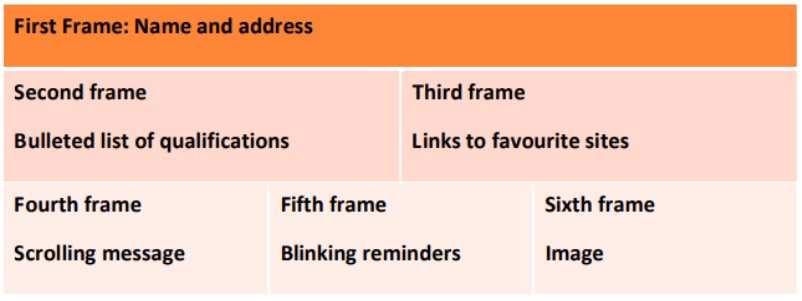
  <!DOCTYPE html>
  <html>

  <head>
      <title>HTML Layout Frame | DEEPAKRAJTech</title>
      <style>
          table {
              border-collapse: collapse;
              font-family: sans-serif;
              font-size: 22px;
          }

          table, th, td {
              border: 4px solid white;
          }

          .blinking {
              animation: blink-text 1s step-start infinite;
          }

          @keyframes blink-text {
              50% {
                  opacity: 0;
              }
          }
      </style>
  </head>

  <body>
      <table width="100%" cellpadding="16">
          <tr bgcolor="#f97316">
              <th colspan="3">
                  <p>
                      Name : DEEPAK RAJ Mishra, Address : Sultanpur Uttar Pradesh India
                      228001
                  </p>
              </th>
          </tr>
          <tr bgcolor="#ffe5e0">
              <td>
                  <h3>Qualification</h3>
                  <ul>
                      <li>ADCA</li>
                      <li>CCC</li>
                      <li>BCA</li>
                      <li>O Level</li>
                      <li>A Level</li>
                  </ul>
              </td>
              <td colspan="2">
                  <h3>Favorite Website</h3>
                  <ul>
                      <li><a href="https://deepakrajtech.com">DEEPAKRAJTech</a></li>
                      <li>
                          <a href="https://www.youtube.com/@deepakrajtech">YouTube</a>
                      </li>
                      <li>
                          <a href="https://www.instagram.com/deepakrajtech/">Instagram</a>
                      </li>
                      <li>
                          <a href="https://www.facebook.com/deepakrajtech/">Facebook</a>
                      </li>
                      <li><a href="https://www.google.com/deepakrajtech/">Google</a></li>
                  </ul>
              </td>
          </tr>
          <tr align="center" bgcolor="#fff0eb">
              <td width="33%">
                  <marquee><b>DEEPAKRAJTech | BCA | NIELIT O Level | Follow @deepakrajtech for
                          more updates!</b></marquee>
              </td>
              <td width="33%">
                  <p class="blinking"><b>Subscribe to DEEPAKRAJTech</b></p>
              </td>
              <td width="34%">
                  <img src="https://picsum.photos/150" alt="Technology" />
              </td>
          </tr>
      </table>
  </body>

  </html>
▶️
Watch Now on YouTube
  <!DOCTYPE html>
  <html>
  <head>
    <meta charset="UTF-8">
    <title>Polynomial Expression | DEEPAKRAJTech</title>
    <style>
     p{
      font-family: sans-serif;
      font-size: 48px;
      text-align: center;
     }
    </style>
  </head>
  <body>
    <p>
     a<sup>0</sup> + a<sup>1</sup> x + a<sup>2</sup> x<sup>2 </sup> + a<sup>3</  sup> x<sup>3</sup>
    </p>
  </body>
  </html>
▶️
Watch Now on YouTube
  <!DOCTYPE html>
  <html>
  <head>
    <meta charset="UTF-8">
    <title>Colorful Lines | DEEPAKRAJTech</title>
    <style>
      body {
        font-size: 22px;
        font-family: sans-serif;
        text-align: center;
        background-color: black;
      }
      hr {
          height: 4px;
      }
    </style>
  </head>
  <body>

    <p style="color: red;">This line is red.</p>
    <hr color="red">

    <p style="color: blue;">This line is blue.</p>
    <hr color="blue">

    <p style="color: green;">This line is green.</p>
    <hr color="green">

    <p style="color: orange;">This line is orange.</p>
    <hr color="orange">

    <p style="color: purple;">This line is purple.</p>
    <hr color="purple">

    <p style="color: brown;">This line is brown.</p>
    <hr color="brown">

    <p style="color: yellow;">This line is yellow.</p>
    <hr color="yellow">

  </body>
  </html>
▶️
Watch Now on YouTube
  <!DOCTYPE html>
  <html>
  <head>
      <meta charset="UTF-8">
      <title>About My City - Sultanpur</title>
      <style>
          body {
              background-color: #f9f9f9;
              font-family: Arial, sans-serif;
              padding: 30px;
          }

          h1 {
              color: blue;
              font-size: 48px;
              text-align: center;
          }

          .landmark1 {
              color: magenta;
              font-family: monospace;
              font-size: 24px;
          }

          .landmark2 {
              color: green;
              font-family: cursive;
              font-style: italic;
              font-size: 24px;
          }

          .landmark3 {
              color: purple;
              font-family: 'Times New Roman', Times, serif;
              text-decoration: underline;
              font-size: 24px;
          }

          .blinking {
              color: red;
              font-size: 24px;
              font-weight: bold;
              animation: blink 1s linear infinite;
          }

          @keyframes blink {
              50% {
                  opacity: 0;
              }
          }

          marquee {
              margin-top: 40px;
              font-size: 20px;
              color: darkblue;
          }
      </style>
  </head>
  <body>
      <h1>Sultanpur</h1>
      <hr>
      <p class="landmark1">1. Paarijaat Tree</p>
      <p class="landmark2">2. Bijethua Mahaviran Temple</p>
      <p class="landmark3">3. Sitakund</p>
      <p class="blinking">Disha Computer Education</p>
      <marquee>Welcome to Sultanpur! A city of dreams and diversity.</marquee>
  </body>
  </html>
▶️
Watch Now on YouTube
  <!DOCTYPE html>
  <head>
      <meta charset="UTF-8">
      <title>Anchor Tag Demo | DEEPAKRAJTech</title>
  </head>
  <body>

      <h1 id="top">HTML Anchor Tag Examples</h1>
      <hr>

      <!-- 1. Web link that opens in a new window -->
      <p><strong>1. Link that opens in a new tab/window:</strong><br>
      <a href="https://www.google.com" target="_blank">Open Google in New Window</a></p>

      <!-- 2. Web link that opens in the same window -->
      <p><strong>2. Link that opens in the same window:</strong><br>
      <a href="https://www.google.com" target="_self">Open Google in Same Window</a></p>

      <!-- 3. C Reference within the same document -->
      <p><strong>3. Jump to top of the same page:</strong><br>
      <a href="#top">Go to Top C</a></p>

      <!-- 4. Reference to some image -->
      <p><strong>4. Clickable link to an image:</strong><br>
      <a href="krishna_2.jpg" target="_blank">Click here to view image1.jpg</a></p>

      <!-- 5. Making an image a hyperlink to display second image -->
      <p><strong>5. Clickable image that opens another image:</strong><br>
      <a href="krishna_2.jpg" target="_blank">
          <img src="krishna_1.jpg" alt="Click to view another image" width="200">
      </a></p>

  </body>
  </html>
▶️
Watch Now on YouTube
  <!DOCTYPE html>
  <html>

  <head>
      <title>Ordered List Example | DEEPAKRAJTech</title>
  </head>

  <body>

      <h2>My Favorite Drinks</h2>

      <ol>
          <li>Coffee</li>
          <li>Tea</li>
          <li>Black Tea</li>
          <li>Green Tea</li>
          <li>Milk</li>
      </ol>

  </body>

  </html>
▶️
Watch Now on YouTube
  <!DOCTYPE html>
  <html>
  <head>
    <title>Personal Data Form | DEEPAKRAJTech</title>
  </head>
  <body>
    <h2>Personal Information Form</h2>
    <form action="#" method="post">

      <label for="name">Full Name:</label><br>
      <input type="text" id="name" name="fullname" required><br><br>

      <label for="pwd">Password:</label><br>
      <input type="password" id="pwd" name="password" required><br><br>

      <label for="email">Email ID:</label><br>
      <input type="email" id="email" name="email" required><br><br>

      <label for="gender">Gender:</label><br>
      <input type="radio" id="male" name="gender" value="Male">
      <label for="male">Male</label>
      <input type="radio" id="female" name="gender" value="Female">
      <label for="female">Female</label><br><br>

      <label for="dob">Date of Birth:</label><br>
      <input type="date" id="dob" name="dob"><br><br>

      <label for="city">Select City:</label><br>
      <select id="city" name="city">
        <option value="">--Select--</option>
        <option value="Delhi">Delhi</option>
        <option value="Mumbai">Mumbai</option>
        <option value="Chennai">Chennai</option>
        <option value="Kolkata">Kolkata</option>
      </select><br><br>

      <label>Hobbies:</label><br>
      <input type="checkbox" name="hobby" value="Reading">Reading
      <input type="checkbox" name="hobby" value="Traveling">Traveling
      <input type="checkbox" name="hobby" value="Coding">Coding<br><br>

      <input type="submit" value="Submit">
      <input type="reset" value="Reset">

    </form>
  </body>
  </html>
▶️
Watch Now on YouTube
  <!DOCTYPE html>
  <html lang="en">
  <head>
      <meta charset="UTF-8">
      <title>DEEPAKRAJTech | My First Web Page</title>
  </head>
  <body>
      <h1>Welcome to My First Web Page</h1>

      <p>This is my very first paragraph in HTML. I'm learning how to create web
      pages using HTML and it's really exciting!</p>

      <p>HTML stands for HyperText Markup Language and it's used to design the
      structure of web pages on the internet.</p>
  </body>
  </html>
▶️
Watch Now on YouTube